 Jigsaw
Photo: Maarten van der Bent — CC BY-SA 2.0. Source: Wikimedia Commons.
About this place ↓About Wooden Fence in the Fouta Djallon Hills, Guinea
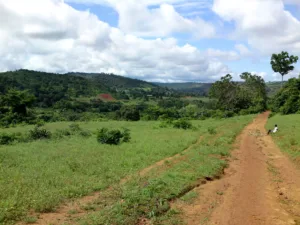
Fences of branches and poles are a familiar sight in the Fouta Djallon, where they keep the herds of cattle, goats and sheep out of the gardens and fields. Each family plot, called a tapade, is surrounded by such a fence and planted with vegetables, fruit trees and maize close to the house. Cattle have long been a sign of wealth for the Fula herders of the region, and they graze freely on the open hillsides. In this photo a rough wooden fence runs beside a green meadow towards wooded hills under a bright sky.
Puzzle tip: start with the wooden fence on the right; the green meadow comes next, and the dark trees and the pale sky last.
- Theme
- Nature
Moving pieces: Drag a piece with your mouse or finger. With a mouse you can also click a piece once to pick it up — it follows the pointer until you click again to set it down.
Joining pieces: Drop a piece near its matching neighbour and it snaps into place with a click. Joined pieces move together as one group. There’s no fixed spot to build in — assemble anywhere on the table.
Play As: Pick how many pieces to cut the picture into, from 12 up to 300. Switch on Hard shape at the bottom of the menu for trickier pieces with three knobs on every side. Changing either setting starts the puzzle over.
Table: At the very bottom of Play As, choose what you build on: leather, light oak, green felt or charcoal. Your choice is remembered for every puzzle and doesn’t restart the one you’re on. Light oak table photo by simon on Unsplash.
Pause: Click the timer, or the pause button next to it. The table is covered while paused so nobody can sneak a look; click it (or the timer) to carry on.
Show picture: The picture button shows the finished image as a guide. Click it again to hide it.
Arrange pieces: Lines up all loose pieces in tidy rows at the sides of the table, handy for spotting edges or a missing piece. Click again to scatter them. Pieces you’ve already joined stay exactly where you left them.
Restart: Mixes up the pieces and starts again with the same settings.
Fullscreen: The last button on the bar gives the puzzle the whole screen. Press it again or Esc to leave.
Progress: In the middle of the bar, the counter shows how many pieces are joined, and the percentage shows how much of the picture is done.
Finishing: When the last piece clicks in, the timer stops at your finishing time, and you can play again or try another puzzle at the same size and shape.
Puzzle: Jigsaw Earth — free online jigsaw puzzles of places around the world.