Photo: Enrique — Pexels License. Source: Pexels.
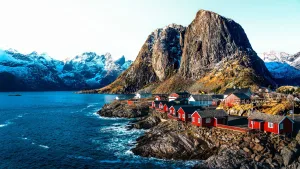
About this place ↓In the mountains of western Norway, green valleys of birch and pine lie below peaks that keep their snow well into summer. Many of the roads that cross these mountains are closed by deep snow from autumn to late spring, and some only open in June. Norway's mountains are among the oldest in Europe, worn down and shaped by glaciers, and they cover so much of the country that only a small part of the land can be farmed.
Puzzle tip: the snowy peaks and the clouds are a good place to start; the green trees in front are best sorted by shade.
Moving pieces: Drag a piece with your mouse or finger. With a mouse you can also click a piece once to pick it up — it follows the pointer until you click again to set it down.
Joining pieces: Drop a piece near its matching neighbour and it snaps into place with a click. Joined pieces move together as one group. There’s no fixed spot to build in — assemble anywhere on the table.
Play As: Pick how many pieces to cut the picture into, from 12 up to 300. Switch on Hard shape at the bottom of the menu for trickier pieces with three knobs on every side. Changing either setting starts the puzzle over.
Table: At the very bottom of Play As, choose what you build on: leather, light oak, green felt or charcoal. Your choice is remembered for every puzzle and doesn’t restart the one you’re on. Light oak table photo by simon on Unsplash.
Pause: Click the timer, or the pause button next to it. The table is covered while paused so nobody can sneak a look; click it (or the timer) to carry on.
Show picture: The picture button shows the finished image as a guide. Click it again to hide it.
Arrange pieces: Lines up all loose pieces in tidy rows at the sides of the table, handy for spotting edges or a missing piece. Click again to scatter them. Pieces you’ve already joined stay exactly where you left them.
Restart: Mixes up the pieces and starts again with the same settings.
Fullscreen: The last button on the bar gives the puzzle the whole screen. Press it again or Esc to leave.
Progress: In the middle of the bar, the counter shows how many pieces are joined, and the percentage shows how much of the picture is done.
Finishing: When the last piece clicks in, the timer stops at your finishing time, and you can play again or try another puzzle at the same size and shape.
Puzzle: Jigsaw Earth — free online jigsaw puzzles of places around the world.
 Jigsaw